Wednesday, February 17, 2010

Optimizing SQL Server Joins - Part 2

In my last post, I talked about covering the query and the join expression, with a single index, http://jahaines.blogspot.com/2010/01/optimizing-sql-server-joins.html. Covering the join expression allows the optimizer to seek the joining column and has the benefit of removing the very costly Key/RID lookup. In this post, I will be talking about optimizing join order.

Let’s start with a very simplistic definition of join order. Join order is the order in which the optimizer processes tables involved in the join clause. When tables are processed, the tables are placed in either the top or bottom input, which dictates how the data is searched and how many rows are affected. There is plenty of misinformation out there stating that the order you specify your joins in can directly impact query performance. While this is partially true, it is more the exception than the rule. This misinformation came about because the optimizer is a cost based optimizer. The optimizer has to determine the best plan in the shortest amount of time. The optimizer does not have all the time in the world to test each and every join order or permutation. Because the optimizer cannot evaluate every possible permutation (in some cases), it is possible for the optimizer to miss a more optimal join order, but this would only happen when a query has an exuberant number of joins. Like I said before this is not a regular occurrence. In almost all cases, the join order is of negligible concern. Let’s see this in action.

First I will create my sample tables and load them with data.

USE tempdb
GO

IF OBJECT_ID('tempdb.dbo.Customers') IS NOT NULL
BEGIN
    DROP TABLE dbo.Customers;
END
GO

CREATE TABLE dbo.Customers(
CustId INT IDENTITY(1,1) PRIMARY KEY CLUSTERED,
FName VARCHAR(50),
LName VARCHAR(50)
);
GO

;WITH 
   L0 AS (SELECT 1 AS C UNION ALL SELECT 1)       --2 rows
  ,L1 AS (SELECT 1 AS C FROM L0 AS A, L0 AS B)    --4 rows (2x2)
  ,L2 AS (SELECT 1 AS C FROM L1 AS A, L1 AS B)    --16 rows (4x4)
  ,L3 AS (SELECT 1 AS C FROM L2 AS A, L2 AS B)    --256 rows (16x16)
  ,L4 AS (SELECT 1 AS C FROM L3 AS A, L3 AS B)    --65536 rows (256x256)
  ,L5 AS (SELECT 1 AS C FROM L4 AS A, L4 AS B)    --4,294,967,296 rows (65536x65536)
  ,Nums AS (SELECT row_number() OVER (ORDER BY (SELECT 0)) AS N FROM L5)  
INSERT dbo.Customers(FName,LName)
SELECT 
    'FName' + CAST(N AS VARCHAR(10)),
    'LName' + CAST(N AS VARCHAR(10))    
FROM Nums
WHERE N<=1000;
GO

IF OBJECT_ID('tempdb.dbo.Orders') IS NOT NULL
BEGIN
    DROP TABLE dbo.Orders;
END
GO

CREATE TABLE dbo.Orders(
OrderId INT IDENTITY(1,1) PRIMARY KEY CLUSTERED,
CustId INT
);
GO

;WITH 
   L0 AS (SELECT 1 AS C UNION ALL SELECT 1)       --2 rows
  ,L1 AS (SELECT 1 AS C FROM L0 AS A, L0 AS B)    --4 rows (2x2)
  ,L2 AS (SELECT 1 AS C FROM L1 AS A, L1 AS B)    --16 rows (4x4)
  ,L3 AS (SELECT 1 AS C FROM L2 AS A, L2 AS B)    --256 rows (16x16)
  ,L4 AS (SELECT 1 AS C FROM L3 AS A, L3 AS B)    --65536 rows (256x256)
  ,L5 AS (SELECT 1 AS C FROM L4 AS A, L4 AS B)    --4,294,967,296 rows (65536x65536)
  ,Nums AS (SELECT row_number() OVER (ORDER BY (SELECT 0)) AS N FROM L5)  
INSERT dbo.Orders(CustId)
SELECT 
     ABS(CHECKSUM(NEWID())%250+65)   
FROM Nums
WHERE N<=100;
GO

CREATE NONCLUSTERED INDEX ncl_idx_CustId ON dbo.Orders(CustId);
GO
First and foremost, I really do not recommend using HINTS like FOREPLAN, Plan Guides, or OPTION(FORCE ORDER), unless it is a last resort. In most cases, performance problems can be attributed to non-scalable code, and/or missing indexes; therefore, the first step in solving performance problems is to optimize code. In this post, I will be using FORCEPLAN to illustrate how join order can affect performance. I will start by running a set of simple queries. One query will not use FORCEPLAN and the other will use FORCEPLAN. FORCEPLAN makes the optimizer maintain the JOIN order specified. One of the biggest drawbacks of FORCEPLAN is that a nested loop join will likely be used, which may or may not be efficient for your query plan. The optimizer can still use other types of joins if other hints are used, or the optimizer has to use another join to satisfy the query. You can find more information on FORCEPLAN here, http://msdn.microsoft.com/en-us/library/ms188344.aspx. SQL Server 2005 has more force options available that do not have the same join type limitation, such as OPTION(FORCE ORDER), Plan hints, and plan guides; however, these can be just as bad for performance, if used excessively or inappropriately.
 
SET STATISTICS IO ON;
SET STATISTICS PROFILE ON;
GO

SELECT o.CustId,c.FName,c.LName
FROM dbo.Orders o
INNER JOIN dbo.Customers c
    ON c.CustId = o.CustId
WHERE c.LName = 'LName151'

SET STATISTICS IO OFF;
SET STATISTICS PROFILE OFF;
GO

/*
Table 'Orders'. Scan count 1, logical reads 2, physical reads 0, read-ahead reads 0, lob logical reads 0, lob physical reads 0, lob read-ahead reads 0.
Table 'Customers'. Scan count 1, logical reads 7, physical reads 0, read-ahead reads 0, lob logical reads 0, lob physical reads 0, lob read-ahead reads 0.

SELECT o.CustId,c.FName,c.LName  FROM dbo.Orders o  INNER JOIN dbo.Customers c   ON c.CustId = o.CustId  WHERE   c.LName = 'LName151'
  |--Nested Loops(Inner Join, OUTER REFERENCES:([c].[CustId]))
       |--Clustered Index Scan(OBJECT:([tempdb].[dbo].[Customers].[PK__Customers__7E6CC920] AS [c]), WHERE:([tempdb].[dbo].[Customers].[LName] as [c].[LName]='LName151'))
       |--Index Seek(OBJECT:([tempdb].[dbo].[Orders].[ncl_idx_CustId] AS [o]), SEEK:([o].[CustId]=[tempdb].[dbo].[Customers].[CustId] as [c].[CustId]) ORDERED FORWARD)
*/
GO
 
As you can see, the Customers table is used as the OUTER table and Orders table is the INNER table, which supports my saying the optimizer is free to rearrange the predicate. For each row in the outer table the INNER table has to be scanned. If you use, FORCEPLAN the optimizer will make the OUTER TABLE Orders and the INNER table Customers. The first problem I encounter is the Orders table does not have a where clause, so the index seek on Orders will go away, but the optimizer will be able to seek Customers on CustId. Additionally, I have made the OUTER table (Orders) smaller, which means the optimizer will have less passes on the INNER table (Customers); however, the optimizer will have to scan/seek through a lot more data to return the results. Using FORCEPLAN can really degrade performance and in this case results more than 30 times more reads.
 
SET FORCEPLAN ON;
SET STATISTICS IO ON;
SET STATISTICS PROFILE ON;
GO

SELECT o.CustId,c.FName,c.LName
FROM dbo.Orders o
INNER JOIN dbo.Customers c
    ON c.CustId = o.CustId
WHERE c.LName = 'LName151'

SET FORCEPLAN OFF;
SET STATISTICS IO OFF;
SET STATISTICS PROFILE OFF;
GO

/*
Table 'Customers'. Scan count 0, logical reads 200, physical reads 0, read-ahead reads 0, lob logical reads 0, lob physical reads 0, lob read-ahead reads 0.
Table 'Orders'. Scan count 1, logical reads 2, physical reads 0, read-ahead reads 0, lob logical reads 0, lob physical reads 0, lob read-ahead reads 0.


SELECT o.CustId,c.FName,c.LName  FROM dbo.Orders o  INNER JOIN dbo.Customers c   ON c.CustId = o.CustId  WHERE c.LName = 'LName151'
  |--Nested Loops(Inner Join, OUTER REFERENCES:([o].[CustId]))
       |--Index Scan(OBJECT:([tempdb].[dbo].[Orders].[ncl_idx_CustId] AS [o]))
       |--Clustered Index Seek(OBJECT:([tempdb].[dbo].[Customers].[PK__Customers__7E6CC920] AS [c]), SEEK:([c].[CustId]=[tempdb].[dbo].[Orders].[CustId] as [o].[CustId]),  WHERE:([tempdb].[dbo].[Customers].[LName] as [c].[LName]='LName151') ORDERED FORWARD)
*/

As you can see, adding or misusing query hints can really degrade query performance. In my opinion, the worst part about using hints is you prohibit the optimizer from logically deducing the best way to solve a query. Developers often neglect to see the long term impact of using hints, as data distribution, indexes, and business requirements change over time. One of the best thing you can do is leave the optimizer alone and let it go to work. A lot of times developers think they know better than the optimizer or that they can trick it; however, this almost always ends in bad performance. Query hints are quite often band-aids to much larger problems; however, under certain circumstances there can be a benefit in using query hints and this is why they exist. For more information on how to help persuade the optimizer to do what you want, you can use thing following link, http://msdn.microsoft.com/en-us/library/cc917694.aspx. There are a more options in SQL 2005+ that give developers and DBAs more control over query execute plans; however, I still recommend that you solve performance problems by optimizing code and/or adding indexes. Only when you have evaluated all other options, should you consider using hints or guides. All-in-all, the most typical way to optimize join order is to leave it alone.

Until next time happy coding.
Wednesday, January 27, 2010

Optimizing SQL Server Joins

Today a colleague asked me a question about performance optimization regarding joins.  I gave him a pretty detailed answer over the phone, but I do not think I really made my message stick, which is the reason for this post.  The first and most important thing to remember is the optimizer can only choose one physical operator per table.  The only exception to this is when the optimizer decides to use index intersection, http://www.sqlmag.com/Articles/ArticleID/94116/94116.html?Ad=1 (SQL 2005+).  Index intersection occurs when the optimizer creates its own join and uses two indexes to satisfy the predicate.   While index intersection is still aligned with what I said, index intersection does add an additional table reference to the query plan, which should be noted.  If the same table is referenced multiple times, the execution plan will have more than than one physical operator at varying stages of the execution plan.  When tables are joined together SQL Server creates a constrained Cartesian product, which is nothing more than matching rows based on a given join expression. To do this SQL Server uses a join (Merge, Hash or Nested Loop)  and creates an INNER (Bottom) and OUTER (Top) set.  I use the word set here because the INNER does not have to be a table.  INNER can actually be a constrained Cartesian product. Essentially, the optimizer chooses a base (OUTER) set and will then filter the INNER set based on the results from the outer set.  The optimizer then continues to filter the set for each join, until the query is satisfied.  It is important to know that the optimizer is under no obligation to join tables in the order you have specified.  The optimizer is free to rearrange joins as it sees fit.  Let’s start by creating our sample objects.

USE [tempdb]
GO

SET NOCOUNT ON;
GO

IF OBJECT_ID('tempdb.dbo.State') IS NOT NULL
BEGIN
    DROP TABLE dbo.[State];
END
GO

CREATE TABLE dbo.[State](
State_Cd CHAR(2),
Descr VARCHAR(150)
);
GO

INSERT INTO dbo.[State] ([State_Cd],[Descr]) VALUES ('AL','Alabama');
INSERT INTO dbo.[State] ([State_Cd],[Descr]) VALUES ('LA','Louisiana');
GO

IF OBJECT_ID('tempdb.dbo.City') IS NOT NULL
BEGIN
    DROP TABLE dbo.[City];
END
GO

CREATE TABLE dbo.[City](
State_Cd CHAR(2),
City_Cd VARCHAR(100)
);
GO

INSERT INTO dbo.[City] ([State_Cd],[City_Cd]) VALUES ('AL','Mobile');
INSERT INTO dbo.[City] ([State_Cd],[City_Cd]) VALUES ('LA','New Orleans');
INSERT INTO dbo.[City] ([State_Cd],[City_Cd]) VALUES ('LA','Luling');
GO

IF OBJECT_ID('tempdb.dbo.Zip') IS NOT NULL
BEGIN
    DROP TABLE dbo.[Zip];
END
GO

CREATE TABLE dbo.Zip(
City_Cd VARCHAR(100),
Zip_Cd VARCHAR(10),
);
GO

INSERT INTO dbo.Zip ([City_Cd],[Zip_Cd]) VALUES ('Mobile','36601');
INSERT INTO dbo.Zip ([City_Cd],[Zip_Cd]) VALUES ('New Orleans','70121');
INSERT INTO dbo.Zip ([City_Cd],[Zip_Cd]) VALUES ('Luling','70070');
GO

Now that we have our tables, lets execute a very simplistic query.

Note:   There are no indexes present on any tables, so all queries will result in a  table scan.

--Qry 1
SELECT s.[Descr]
FROM dbo.[State] s

image

Now let’s add a second table to the query to see what happens.  What we should see is a nested loop join and two table scans. 

--Qry 2
SELECT s.[Descr],c.City_Cd
FROM dbo.[State] s
INNER JOIN dbo.[City] c    ON s.[State_Cd] = c.[State_Cd]

image

The screenshot above shows the State table has been chosen as the base query.  As you can see, each table is represented by a single Table scan operator.   Let’s add one more table to the mix to see how the optimizer will react.

--Qry 3
SELECT s.[Descr],c.City_Cd,z.Zip_Cd
FROM dbo.[State] s
INNER JOIN dbo.[City] c    ON s.[State_Cd] = c.[State_Cd]
INNER JOIN dbo.[Zip] z ON z.[City_Cd] = c.[City_Cd]

image 

The optimizer decided to make the first OUTER table State and then decided to make the INNER  a constrained Cartesian product of City and Zip .   This is especially important when you are optimizing code because it is a lot easier to fix problems when you know how indexes and joins really work.  For this example, I see that we are scanning Zip and City, so that tells me that I am missing an index on these two tables. Remember the general rule of thumb is to have indexes on all column participating in the join expression. I will start the optimization process by adding an index to the Zip table, on the City_Cd column.

CREATE NONCLUSTERED INDEX ncl_idx_Zip_City_Cd ON dbo.[Zip](City_Cd);

image

Wow, look at how the query plan changed.  We now see our index seek on Zip, but we now see a RID lookup.  Lookups can become performance bottlenecks really quickly and can sometimes cause blocking or even worse dead locks.  Key Lookups can cause blocking and deadlocks because the optimizer has to take a shared lock on the Clustered Index to get the data that is missing from the nonclustered  index and this causes a problem when an insert/update/delete occurs because it requires an exclusive lock, on the Clustered Index.  In our example, We have an index on Zip which only contains the column City_Cd; however, we are selecting Zip_Cd.  Because Zip_Cd does not exist in the index, the optimizer has to go back to the heap to get the remaining column data.  To solve this problem we need to add Zip_Cd to the index.  I will be adding the Zip_Cd column via the INCLUDE clause.  I chose INCLUDE because I am not using this column in the predicate and using the INCLUDE clause keeps the index relatively small because the value is only stored at the leaf level of the nonclustered index.  You may want to add the column to the index key if you use the column in a lot of predicates because SQL Server maintains statistics on index key columns, but not columns in the INCLUDE clause.  Statistics are used used by SQL Server to estimate cardinality.  Better cardinality estimates allow the optimizer to make better decisions about what operators are best for the given query.  Essentially, better cardinality estimates can be the difference between a scan and a seek. You have to weigh the cost of index maintenance and performance when deciding which method to choose.  For more information regarding INCLUDE please visit this link, http://msdn.microsoft.com/en-us/library/ms190806.aspx.

Note: If you are not sure what columns need to be added to the index you can hover your mouse over the lookup and look at the output list.  The index that you need to add the columns too will always be the seek operator to the right of the lookup operator.

IF EXISTS(SELECT 1 FROM sys.indexes WHERE name = 'ncl_idx_Zip_City_Cd')
BEGIN
    DROP INDEX ncl_idx_Zip_City_Cd ON dbo.Zip;
END
GO

CREATE NONCLUSTERED INDEX ncl_idx_Zip_City_Cd ON dbo.[Zip](City_Cd)INCLUDE([Zip_Cd]);
GO

Now Execute the query again.

--Qry 3
SELECT s.[Descr],c.City_Cd,z.Zip_Cd
FROM dbo.[State] s
INNER JOIN dbo.[City] c ON s.[State_Cd] = c.[State_Cd]
INNER JOIN dbo.[Zip] z ON z.[City_Cd] = c.[City_Cd]

image

Now that is a little better but lets make this query even faster. Next, I will add an index to the City table, making sure to include City_Cd.

CREATE NONCLUSTERED INDEX ncl_idx_City_State_Cd ON dbo.City(State_Cd)INCLUDE([City_Cd]);
GO

Now execute the query again.

--Qry 3
SELECT s.[Descr],c.City_Cd,z.Zip_Cd
FROM dbo.[State] s
INNER JOIN dbo.[City] c ON s.[State_Cd] = c.[State_Cd]
INNER JOIN dbo.[Zip] z ON z.[City_Cd] = c.[City_Cd]

image

How about them apples?  By adding the proper indexes in place we can now get index seeks across the board.  It is important to note that we cannot seek State because we have no predicate filter on any columns in the state table, so the optimizer has to scan.  When you are trying to optimize queries the first place to look is the execution plan.  If you see a lot of scans, you have a lot of optimization potential.  Remember that you want to make sure all columns in the select, the join and the where clause are present in your index.  Please do not tell your boss that you need to create indexes to cover every query in your environment. You will not be able to fully cover every query in your environment, but the important thing is to optimize and cover the queries that are really expensive or causing problems. Who knows you maybe able to cover multiple queries by creating or modifying a single index.

That’s it for now.  I hope I have cleared up how the optimizer handles joins and given you greater insight on how to optimize joins. Until next time happy coding.

Wednesday, January 20, 2010

SQL Server Myths Debunked (Part 2)

question-mark Last time I went over some of the most misconstrued myths to hit SQL Server, http://jahaines.blogspot.com/2010/01/sql-server-myths-debunked-part-1.html.  In this post I will be finishing the remaining items and I encourage you to post any comments about any myths you have seen or you have questions about. 


Below is the list of Items I will be addressing in this post:

  • Table data can be stored separately of the clustered index
  • Columns just need to exist in the index to be used
  • While loops are faster/better than cursors
  • Sp_executesql is always better than exec
  • Tables have a guaranteed sort order

Table data can be stored separately of the clustered index

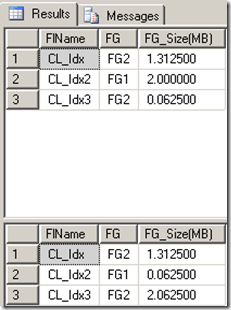
The first myth I will be talking about is the myth that table data can exist separately of the clustered index.  This myth is absolutely false.  Table data exists in the clustered index.  This means the table does not store any data.  If the table is on a differing filegroup than the clustered index, the filegroup containing the table will be empty because the “table” is actually moved with the clustered index.  It should be noted that any non clustered indexes will remain on the same filegroup.  Let’s see this in action.

SET NOCOUNT ON
GO

USE master
GO

IF EXISTS(SELECT 1 FROM sys.databases WHERE NAME='CL_Idx')
BEGIN
    DROP DATABASE [CL_Idx];
END
GO

CREATE DATABASE [CL_Idx] ON  PRIMARY 
( NAME = N'CL_Idx', FILENAME = N'C:\Program Files\Microsoft SQL Server\MSSQL10.DEV\MSSQL\DATA\CL_Idx.mdf' , SIZE = 4096KB , FILEGROWTH = 0 ), 
 FILEGROUP [FG1] 
( NAME = N'CL_Idx2', FILENAME = N'C:\Program Files\Microsoft SQL Server\MSSQL10.DEV\MSSQL\DATA\CL_Idx2.ndf' , SIZE = 4096KB , FILEGROWTH = 0 ), 
 FILEGROUP [FG2] 
( NAME = N'CL_Idx3', FILENAME = N'C:\Program Files\Microsoft SQL Server\MSSQL10.DEV\MSSQL\DATA\CL_Idx3.ndf' , SIZE = 4096KB , FILEGROWTH = 0 )
 LOG ON 
( NAME = N'CL_Idx_log', FILENAME = N'C:\Program Files\Microsoft SQL Server\MSSQL10.DEV\MSSQL\DATA\CL_Idx_log.ldf' , SIZE = 4096KB , FILEGROWTH = 10%)
GO

IF NOT EXISTS (SELECT name FROM sys.filegroups WHERE is_default=1 AND name = N'FG1') 
ALTER DATABASE [CL_Idx] MODIFY FILEGROUP [FG1] DEFAULT
GO

USE [CL_Idx]
GO

IF OBJECT_ID('[CL_Idx].dbo.TestData') IS NOT NULL
BEGIN
    DROP TABLE dbo.TestData;
END
GO

CREATE TABLE dbo.TestData(
RowNum INT,
SomeId INT,
SomeCode CHAR(2)
) ON [FG1];
GO

INSERT INTO dbo.TestData
SELECT TOP 100000 
    ROW_NUMBER() OVER (ORDER BY t1.NAME) AS RowNumber,
    ABS(CHECKSUM(NEWID()))%2500+1 AS SomeId, 
    CHAR(ABS(CHECKSUM(NEWID()))%26+65)
    + CHAR(ABS(CHECKSUM(NEWID()))%26+65) AS SomeCode
FROM 
    Master.dbo.SysColumns t1,
    Master.dbo.SysColumns t2
GO

SELECT 
    CONVERT(varchar(10),s.NAME) AS FlName, 
    CASE WHEN s.name = 'CL_Idx2' THEN 'FG1' ELSE 'FG2' END AS FG,
    (FILEPROPERTY(s.name,'spaceused') * 8)/1024. AS [FG_Size(MB)]
FROM sys.master_files s
WHERE 
    database_id = DB_ID()
    AND type = 0
GO

CREATE UNIQUE CLUSTERED INDEX unq_cl_idx_Row_Num ON dbo.TestData(RowNum) ON FG2;
GO

SELECT 
    CONVERT(varchar(10),s.NAME) AS FlName, 
    CASE WHEN s.name = 'CL_Idx2' THEN 'FG1' ELSE 'FG2' END AS FG,
    (FILEPROPERTY(s.name,'spaceused') * 8)/1024. AS [FG_Size(MB)]
FROM sys.master_files s
WHERE 
    database_id = DB_ID()
    AND type = 0
GO

Results:

image

Columns just need to exist in the index to be used

The next myth is one of the primary causes of poor performance.  Some believe that simply having a column in the index means the optimizer can use that index to seek rows.  This believe is very far from the truth.  In reality, the index has to be the leftmost column in the index key to be used to seek the row.  This means the query predicate has to contain the leftmost index key; otherwise, you will get an index scan. Before I show you an example, here is a link that describes index basics, http://jahaines.blogspot.com/2009/07/real-sql-pages-beginners-guide-to.html.  Let’s get to the example.

SET NOCOUNT ON;
GO

IF OBJECT_ID('tempdb.dbo.#Customers') IS NOT NULL
BEGIN
    DROP TABLE #Customers;
END
GO

CREATE TABLE #Customers(
Id INT PRIMARY KEY CLUSTERED,
FName VARCHAR(25),
LName VARCHAR(25)
);
GO

INSERT INTO #Customers VALUES (1,'Adam','Haines');
INSERT INTO #Customers VALUES (2,'John','Smith');
GO

CREATE NONCLUSTERED INDEX ncl_idx_FName ON [#Customers](FName,LName);
GO

SET STATISTICS PROFILE ON;
GO

SELECT FName,LName
FROM [#Customers]
WHERE LName = 'Haines'
GO

SET STATISTICS PROFILE OFF;
GO

DROP INDEX ncl_idx_FName ON [#Customers];
GO

CREATE NONCLUSTERED INDEX ncl_idx_FName ON [#Customers](LName,FName);
GO

SET STATISTICS PROFILE ON;
GO

SELECT FName,LName
FROM [#Customers]
WHERE LName = 'Haines'
GO

SET STATISTICS PROFILE OFF;
GO

Results:

image

Now by switching the order of the index columns we will get an index seek.

While loops are faster/better than cursors

The next myth is while loops are faster/better than cursors.  This is not true in all scenarios, but it is occasionally true.  The performance solely depends on what you are doing and how you are doing it.  I wont post an example for this because there are too many variances that can occur and I would have to dedicate an entire post on the differences. I will say that you should avoid both of these options, if possible.  These solutions are iterative/recursive in nature, which goes against how SQL Server operates.  90 percent of the time, you can replace iterative logic with set based logic and increase performance 10 fold.  The take away here is while loops are not ALWAYS better….. however there are usually better SET based solutions out there.

Sp_executesql is always better than exec

The next myth has to deal with dynamic SQL and the best way to execute it.  A lot of the time, developers will say that they are using sp_executesql, so the query is optimized.  These believes show a lack of understanding of how sp_executesql really works and where it really benefits.  The short answer is sp_executesql is not always better.  Under some circumstances sp_executesql and exec will produce the same query plan and the query will not be able to benefit from query plan reuse, unless an exact binary match already exists in cache.  This behavior occurs because the developer uses the parameters outside the scope of the dynamic SQL.  Only inline parameters will be used in the parameterization process, using sp_executesql.  Let’s have a look at this.

IF object_id('tempdb.dbo.#t') IS NOT NULL
BEGIN
    DROP TABLE #t;
END
GO

CREATE TABLE #t(
id INT,
col CHAR(1)
);
GO

INSERT INTO #t VALUES (1,'a');
INSERT INTO #t VALUES (2,'b');
INSERT INTO #t VALUES (3,'c');
GO

DECLARE @sql NVARCHAR(MAX),
        @param VARCHAR(25)

SET @param = 'b'        
SET @sql = N'SELECT Id,col FROM #t WHERE col=' + QUOTENAME(@param,'''')
EXEC sp_executesql @sql
GO

DECLARE @sql NVARCHAR(MAX),
        @param VARCHAR(25)

SET @param = 'c'        
SET @sql = 'SELECT Id,col FROM #t WHERE col=' + QUOTENAME(@param,'''')
EXEC(@sql)
GO

DECLARE @sql NVARCHAR(MAX),
        @param VARCHAR(25)

SET @param = 'd'        
SET @sql = N'SELECT Id,col FROM #t WHERE col=' + QUOTENAME(@param,'''')
EXEC sp_executesql @sql
GO


DECLARE @sql NVARCHAR(MAX),
        @param VARCHAR(25)

SET @param = 'e'    
SET @sql = N'SELECT Id,col FROM #t WHERE col= @dyn_param'
EXEC sp_executesql @sql, N'@dyn_param CHAR(1)',@dyn_param=@param
GO

DECLARE @sql NVARCHAR(MAX),
        @param VARCHAR(25)

SET @param = 'f'        
SET @sql = N'SELECT Id,col FROM #t WHERE col= @dyn_param'
EXEC sp_executesql @sql, N'@dyn_param CHAR(1)',@dyn_param=@param
GO

SELECT text, [execution_count] 
FROM sys.dm_exec_query_stats  qs
CROSS APPLY sys.[dm_exec_sql_text](qs.[sql_handle])
WHERE text LIKE '%SELECT Id,col FROM #t%' AND text NOT LIKE '%cross apply%'
ORDER BY [last_execution_time] DESC
GO

Results:

image

As you can see, the only query that took advantage of query plan reuse is the inline parameterized query.  When dealing with dynamic SQL you need to use sp_executesql and inline parameters to take full advantage of query plan reuse.  Also, fully parameterizing dynamic SQL reduces the risk of injection attack.

Tables have a guaranteed sort order

The final myth I will be talking deals with tables and their sort order.  By definition  tables do not have an order.  Tables are an unordered set of rows.  Confusion occurs because clustered indexes are supposed to order the rows.  While clustered indexes do physically sort the rows when they are built, there are no guarantees that clustered indexes will be used, thus you may not get clustered index order.  There are many execution plan operators that can influence the order in which data is returned. Operators such as stream aggregates, partitions, parallelism and even the use of nonclustered indexes can change the order of returned results.  The only guarantee that exists is that there is no guaranteed order, without the use of an ORDER BY clause.  Lets see this in action.

IF object_id('tempdb.dbo.#t') IS NOT NULL
BEGIN
    DROP TABLE #t;
END
GO

CREATE TABLE #t(
Id INT IDENTITY PRIMARY KEY CLUSTERED,
Col CHAR(1)
);
GO

INSERT INTO #t VALUES ('a');
INSERT INTO #t VALUES ('b');
INSERT INTO #t VALUES ('c');
GO

--Clustered Index scan yields clustered index order
SELECT * FROM #t
GO

CREATE UNIQUE NONCLUSTERED INDEX ncl_idx_Id_Col ON [#t](Id DESC,Col);
GO

--NONClustered Index scan yields NONClustered index order
SELECT * FROM [#t]

Results:

image

As you can see, there are a lot of influences to the order of the resultset.  If you need the dataset returned in a specific order you MUST specify an ORDER BY clause; otherwise, you risk using code that will sometimes work.

Wrap-up

That’s it. I have gone through the myths that I have encountered over the years.  If you have any more ideas, or any myths you want to debunk, post comments here.  I hope that you all have learned something new and hopefully the spread of these myths will stop here.

Until next time, happy coding.

Monday, January 11, 2010

SQL Server Myths Debunked (Part 1)

MythBusters Today I wanted to talk about some of the common misconceptions or myths that I have encountered over the years.  A lot of these myths are so wide spread because of the sheer amount of misinformation available.  Myths are born in a number of ways, but typically SQL Server myths are brought to life by propagated misinformation from blogs, articles, unreliable sources etc. that spreads through the community like a wild fire.


Below is a list of myths that I have encountered and will be discussing in this series.

  • Table Variables do not exist in TempDB
  • Table variables cannot have indexes
  • Putting a db in simple recovery stops the log from growing
  • Shrinking a log breaks the log chain 
  • Backing up the transaction log frees up OS storage
  • Table data can be stored separately of the clustered index
  • Columns just need to exist in the index to be used
  • While loops are faster than cursors
  • sp_executesql is always better than exec
  • tables have a guaranteed sort order

    Table Variables do not exist in TempDB

    Lets start with one of my favorite myths.  There is a very common misconception that table variables do not exist in TempDB, but only in memory.  This is absolutely false.  Table variables exist in memory, when they are small enough to fit, but they always consume storage in TempDB and make entries into the TempDB  log.

    The example below demonstrates how you can view the table makeup in sys.tables.

    --Make the master db the current db
    USE [master]
    GO
     
    --Declare a table variable
    DECLARE @t TABLE(
    Id INT,
    Col CHAR(1)
    );
     
    --Get Table Variable Definition
    SELECT t.NAME,c.name,ty.name, [c].[max_length]
    FROM tempdb.sys.tables t 
    INNER JOIN tempdb.sys.columns c
        ON [t].[object_id] = [c].[object_id]
    INNER JOIN tempdb.sys.types ty
        ON [c].[system_type_id] = [ty].[system_type_id]
    WHERE t.name LIKE '#%'

    Table variables cannot have indexes

    The next myth also deals with table variables.  It is often thought that table variables cannot have indexes, which is absolutely false.  Table variables can have indexes, if you specify them at the time of creation.  The only restriction is that you cannot create non-unique indexes.  It is important to remember that even though an index exists on the table variable, the optimizer still does not maintain statistics on table variables.  This means the optimizer will still assume one row, even if a scan is done.

    DECLARE @t TABLE(
    Id INT PRIMARY KEY CLUSTERED,
    Col CHAR(1) UNIQUE
    );
     
    --Get Table Variable Definition
    SELECT i.name, i.type_desc,i.is_unique,i.is_primary_key,i.[is_unique_constraint]
    FROM tempdb.sys.tables t 
    INNER JOIN tempdb.sys.indexes i
        ON i.[object_id] = t.[object_id]
    WHERE t.name LIKE '#%'

    Results:

    image

    Putting a db in simple recovery stops the log from growing

    One of the most misunderstood myths in the SQL Server realm is how the simple recovery model actually works.  Some believe that by changing the recovery model to simple the transaction log will not grow.  This is wrong on so many levels.  If the transaction log were not able to grow, how would any transactions be rolled back?  When the recovery model is set to simple the transaction log still has to grow to accommodate large transactions. Let’s have a look at this in action.

    SET NOCOUNT ON
    GO
     
    USE [master]
    GO
     
    IF db_id('TestSimpleRecovery') IS NOT NULL
    BEGIN
        DROP DATABASE TestSimpleRecovery;
    END
    GO
     
    --Create DB
    CREATE DATABASE TestSimpleRecovery;
    GO
     
    --Change Recovery Model To Simple
    ALTER DATABASE TestSimpleRecovery SET RECOVERY SIMPLE
    GO
     
    --Change the FileGrowth To 100MB
    ALTER DATABASE TestSimpleRecovery 
    MODIFY FILE(NAME = TestSimpleRecovery_Log,FILEGROWTH=100MB);
    GO
     
    --Switch DB Context
    USE [TestSimpleRecovery]
    GO
     
    --Get Current Log Size (before XACT)
    SELECT ((size * 8) / 1024.) / 1024. AS SizeMBsBeforeTransaction
    FROM sys.[master_files]
    WHERE type = 1 AND [database_id] = db_id('TestSimpleRecovery')
    GO
     
    --Drop Sample Table
    IF EXISTS(SELECT 1 FROM sys.tables WHERE NAME = 'TestData')
    BEGIN
        DROP TABLE dbo.[TestData];
    END
    GO
     
    CREATE TABLE dbo.TestData(
    RowNum INT,
    SomeId INT,
    SomeCode CHAR(2)
    );
    GO
     
    DECLARE @i INT
    SET @i = 1
     
    BEGIN TRANSACTION
     
    WHILE @i < 100
    BEGIN
     
    INSERT INTO dbo.TestData
    SELECT TOP 1000
        ROW_NUMBER() OVER (ORDER BY t1.NAME) AS RowNumber,
        ABS(CHECKSUM(NEWID()))%2500+1 AS SomeId, 
        CHAR(ABS(CHECKSUM(NEWID()))%26+65)
        + CHAR(ABS(CHECKSUM(NEWID()))%26+65) AS SomeCode
    FROM 
        Master.dbo.SysColumns t1,
        Master.dbo.SysColumns t2
        
        SET @i = @i + 1 
    END
     
    COMMIT TRANSACTION
    GO
     
    --Get Current Log Size (After XACT)
    SELECT ((size * 8) / 1024.) / 1024. AS SizeMBsAfterTransaction
    FROM sys.[master_files]
    WHERE type = 1 AND [database_id] = db_id('TestSimpleRecovery')
    GO
     
    /*
    SizeMBsBeforeTransaction
    ---------------------------------------
    0.00054931640
     
    SizeMBsAfterTransaction
    ---------------------------------------
    0.09820556640
    */

    Shrinking a log breaks the log chain 

    The next myth I will be discussing is shrinking the transaction log.  It is often purveyed that shrinking the transaction log breaks the log chain.  This is absolutely false!  This is a prime example of how confusion can cause misinformation.  It is true that backing up the log with the truncate only option breaks the log chain, but this is completely different than shrinking the log.  Shrinking the log is used to empty space from a data or log file.  Shrinking the log file does not affect the active portion of the log at all, which means the backup chain is fully intact.  For more information, you should read this article,

    http://msdn.microsoft.com/en-us/library/ms178037.aspx.
    IF NOT EXISTS(SELECT 1 FROM sys.databases WHERE name = 'ShrinkLog_Test')
    BEGIN
        CREATE DATABASE [ShrinkLog_Test];
    END
    GO
     
    BACKUP DATABASE [ShrinkLog_Test]
    TO DISK = 'c:\ShrinkLog_Test.bak' WITH INIT, STATS=10
    GO
     
    BACKUP LOG [ShrinkLog_Test]
    TO DISK = 'c:\ShrinkLog_Test.trn' WITH INIT, STATS=10
    GO
     
    SELECT TOP 1 b.type, b.first_lsn, b.last_lsn
    FROM msdb..backupset b
    WHERE b.[database_name] = 'ShrinkLog_Test'
    ORDER BY [backup_start_date] DESC
     
    /*
    type first_lsn                               last_lsn
    ---- --------------------------------------- ---------------------------------------
    L    41000000005400064                       41000000009000001
    */
     
    USE [ShrinkLog_Test]
    GO
     
    DBCC SHRINKFILE('ShrinkLog_Test_log',1,TRUNCATEONLY)
    GO
     
    SELECT TOP 1 b.type, b.first_lsn, b.last_lsn
    FROM msdb..backupset b
    WHERE b.[database_name] = 'ShrinkLog_Test'
    ORDER BY [backup_start_date] DESC
     
    /*
    type first_lsn                               last_lsn
    ---- --------------------------------------- ---------------------------------------
    L    41000000005400064                       41000000009000001
    */
     
    USE master
    GO
     
    RESTORE DATABASE ShrinkLog_Test FROM DISK = 'c:\ShrinkLog_Test.bak' WITH norecovery, REPLACE
    GO
    RESTORE log ShrinkLog_Test FROM DISK = 'c:\ShrinkLog_Test.trn' WITH recovery, REPLACE
    GO
     
    /*
    Processed 168 pages for database 'ShrinkLog_Test', file 'ShrinkLog_Test' on file 1.
    Processed 3 pages for database 'ShrinkLog_Test', file 'ShrinkLog_Test_log' on file 1.
    RESTORE DATABASE successfully processed 171 pages in 0.061 seconds (21.780 MB/sec).
    Processed 0 pages for database 'ShrinkLog_Test', file 'ShrinkLog_Test' on file 1.
    Processed 5 pages for database 'ShrinkLog_Test', file 'ShrinkLog_Test_log' on file 1.
    RESTORE LOG successfully processed 5 pages in 0.043 seconds (0.794 MB/sec).
    */

    Backing up the transaction log frees up OS storage>

    The next myth is one of the most problematic ones because those who believe this become bedazzled when they backup their transaction log and it does not give the space back to the OS.  I would like to point out that I do not recommend shrinking data files unless you absolutely crunched for space.  Shrinking the log is the only way to return storage back to the OS.

    SET NOCOUNT ON
    GO
     
    USE [master]
    GO
     
    IF db_id('TestSimpleRecovery') IS NOT NULL
    BEGIN
        DROP DATABASE TestSimpleRecovery;
    END
    GO
     
    --Create DB
    CREATE DATABASE TestSimpleRecovery;
    GO
     
    --Change Recovery Model To Simple
    ALTER DATABASE TestSimpleRecovery SET RECOVERY FULL
    GO
     
    --Change the FileGrowth To 100MB
    ALTER DATABASE TestSimpleRecovery 
    MODIFY FILE(NAME = TestSimpleRecovery_Log,FILEGROWTH=100MB);
    GO
     
    BACKUP DATABASE TestSimpleRecovery TO DISK = 'C:\Test.bak'
     
    --Switch DB Context
    USE [TestSimpleRecovery]
    GO
     
    --Get Current Log Size (before XACT)
    SELECT ((size * 8) / 1024.) / 1024. AS SizeMBsBeforeTransaction
    FROM sys.[master_files]
    WHERE type = 1 AND [database_id] = db_id('TestSimpleRecovery')
    GO
     
    --Drop Sample Table
    IF EXISTS(SELECT 1 FROM sys.tables WHERE NAME = 'TestData')
    BEGIN
        DROP TABLE dbo.[TestData];
    END
    GO
     
    CREATE TABLE dbo.TestData(
    RowNum INT,
    SomeId INT,
    SomeCode CHAR(2)
    );
    GO
     
    DECLARE @i INT
    SET @i = 1
     
    BEGIN TRANSACTION
     
    WHILE @i < 100
    BEGIN
     
    INSERT INTO dbo.TestData
    SELECT TOP 1000
        ROW_NUMBER() OVER (ORDER BY t1.NAME) AS RowNumber,
        ABS(CHECKSUM(NEWID()))%2500+1 AS SomeId, 
        CHAR(ABS(CHECKSUM(NEWID()))%26+65)
        + CHAR(ABS(CHECKSUM(NEWID()))%26+65) AS SomeCode
    FROM 
        Master.dbo.SysColumns t1,
        Master.dbo.SysColumns t2
        
        SET @i = @i + 1 
    END
     
    COMMIT TRANSACTION
    GO
     
    --Get Current Log Size (After XACT)
    SELECT ((size * 8) / 1024.) / 1024. AS SizeMBsAfterTransaction
    FROM sys.[master_files]
    WHERE type = 1 AND [database_id] = db_id('TestSimpleRecovery')
    GO
     
    BACKUP log TestSimpleRecovery TO DISK = 'c:\test.trn'
    GO
     
    --Get Current Log Size (After Log Backup)
    SELECT ((size * 8) / 1024.) / 1024. AS SizeMBsAfterBackup
    FROM sys.[master_files]
    WHERE type = 1 AND [database_id] = db_id('TestSimpleRecovery')
    GO
     
    /*
    Processed 168 pages for database 'TestSimpleRecovery', file 'TestSimpleRecovery' on file 1.
    Processed 2 pages for database 'TestSimpleRecovery', file 'TestSimpleRecovery_log' on file 1.
    BACKUP DATABASE successfully processed 170 pages in 0.361 seconds (3.677 MB/sec).
    SizeMBsBeforeTransaction
    ---------------------------------------
    0.00054931640
     
    SizeMBsAfterTransaction
    ---------------------------------------
    0.09820556640
     
    Processed 1407 pages for database 'TestSimpleRecovery', file 'TestSimpleRecovery_log' on file 1.
    BACKUP LOG successfully processed 1407 pages in 3.002 seconds (3.659 MB/sec).
    SizeMBsAfterBackup
    ---------------------------------------
    0.09820556640
    */

    I am trying to keep this series manageable, so I will stop here and pickup the remaining items in part 2, of this series.  If you have any myths that you would like to see busted or have myths you would like to share, please feel free to leave me comments.  Stay tuned part 2!

    Until next time happy coding.

  • Tuesday, December 15, 2009

    SQL Server 2005 – How To Move 10 Millions Rows In 1 Millisecond

    StarWars This blog post is more a tip that I picked up on while at PASS 2009.  Have you ever had the need to copy the contents of an entire table into another table?  Traditionally speaking, we as developers will use SELECT INTO or a INSERT INTO statement to load a destination table.  This is a still a great way of accomplishing the task at hand, but it is not nearly fast as what I am about to show you.  The method I am about to show you is not for all scenarios, but it can be very handy.  I do not know how many Oracle guys are reading this, but I have one question for you, “can your RDMS move 10 millions rows of data in <= 1 millisecond?”  I would be willing to bet that most will answer no, but I have to admit that this is not really a fair fight.  Why is this a little unfair…. let’s have a look at how this works under the hood. 

    This method derives it power based on new partitioning functionality, in SQL Server 2005.  If you have used partitioning in SQL Server 2005, you probably have a good idea where I am going with this.  If not, SQL Server 2005 has built-in functionality that allows tables to be split or divided into what I will call virtual tables, whose values are dependent on predefined boundaries. When the partitioning function column is used in a query predicate the optimizer knows which partition the data resides in, which makes queries more IO efficient.  This is amazing functionality because it does not require application changes and significantly reduces the amount of data SQL Server has to sift through. The partitioning feature I will be focusing on is the feature that allows SQL Server to switch or trade partitions out, ironically named SWTICH.  This is commonly used for situations were you want to move data to a different partition either because the boundaries have changed or you need to phase data out.  The real benefit in using the SWITCH function is SQL Server does not actually move the data, it updates the meta data pointers to the data.  Because I am not actually moving data, I am able to move data around nearly instantaneously, regardless of the number of rows. This is why I said it is not fair, but hey what in life is fair :^)

    Okay let’s see an example.  I will start by creating a sample table.

    USE [tempdb]
    GO
    
    IF EXISTS(SELECT 1 FROM sys.tables WHERE NAME = 'TestData')
    BEGIN
        DROP TABLE [dbo].[TestData];
    END
    GO
    
    CREATE TABLE [dbo].[TestData](
    RowNum INT PRIMARY KEY,
    SomeId INT,
    SomeCode CHAR(2)
    );
    GO
    
    INSERT INTO [dbo].[TestData]
    SELECT TOP 10000000 
        ROW_NUMBER() OVER (ORDER BY t1.NAME) AS RowNumber,
        ABS(CHECKSUM(NEWID()))%2500+1 AS SomeId, 
        CHAR(ABS(CHECKSUM(NEWID()))%26+65)
        + CHAR(ABS(CHECKSUM(NEWID()))%26+65) AS SomeCode
    FROM 
        Master.dbo.SysColumns t1,
        Master.dbo.SysColumns t2
    GO
    
    IF EXISTS(SELECT 1 FROM sys.tables WHERE NAME = 'NewTestData')
    BEGIN
        DROP TABLE [dbo].[NewTestData];
    END
    GO
    
    --Create New Table To Move Data To
    CREATE TABLE [dbo].[NewTestData](
    RowNum INT PRIMARY KEY,
    SomeId INT,
    SomeCode CHAR(2)
    );
    GO

    Now the fun part……. behold the power of SQL Server!!!!!!!!!!!!!!!!

    --Move data to the new table
    SET STATISTICS TIME ON;
    SET STATISTICS IO ON;
    
    ALTER TABLE [dbo].[TestData] SWITCH to [dbo].[NewTestData];
    
    SET STATISTICS TIME OFF;
    SET STATISTICS IO OFF;
    GO
    
    /*
     SQL Server Execution Times:
       CPU time = 0 ms,  elapsed time = 0 ms.
    
     SQL Server Execution Times:
       CPU time = 0 ms,  elapsed time = 1 ms.
    */

    Next, I will verify the results.

    SELECT COUNT(*) FROM [dbo].[TestData]; --0
    SELECT COUNT(*) FROM [dbo].[NewTestData]; --10,000,000
    
    /*
    -----------
    0
    
    (1 row(s) affected)
    
    
    -----------
    10000000
    
    (1 row(s) affected)
    */

    There you have.  I have successfully moved 10 million rows into a new table in 1 MS and incurred no IO through IO stats; however, IO has to be incurred to update meta data, although it should be minimal.  This method has limited use, but can be extremely advantageous.  There are stipulations that have to be met for SWITCH, such as the table you are switching to must be empty and the table must have the same schema.  For a comprehensive list of requirements please refer to this link, http://technet.microsoft.com/en-us/library/ms191160.aspx

    Until next time happy coding.