SQL Server 2005 introduced a new query construct that has the look and feel of a derived table, but offers much more. This new construct is called a CTE or common table expression. CTEs allow developers to name result sets and can directly query the name set, as if it were a table. One of the features that we will primarily looking at today is the CTE’s recursive functionality. If you are not familiar with CTEs , you can read more about them in BOL http://msdn.microsoft.com/en-us/library/ms175972.aspx. Another method will will explore has to do with the a new data type. SQL Server 2008 has a new data type to make querying hierarchical data more efficient; called a “Hierarchy Id.” Hierarchy Id is a great construct that really makes hierarchal data more manageable and more performant. Here is the BOL documentation for the Hierarchy Id data type , http://technet.microsoft.com/en-us/library/bb677290.aspx. We will be using both the recursive CTE and the hierarchy id to query our hierarchal data. Let’s get started.
We will start by creating our table structure.
The first table we are going to create is our employees table. This table will house all the pertinent information related to each employee.
USE [tempdb]
GO
IF EXISTS(SELECT 1 FROM sys.tables WHERE NAME = 'Employee')
BEGIN
DROP TABLE dbo.Employee;
END
GO
--Table to hold employee information
CREATE TABLE dbo.Employee(
EmployeeId INT IDENTITY(1,1) PRIMARY KEY,
FName VARCHAR(50) NOT NULL,
MInitial CHAR(1),
LName VARCHAR(50) NOT NULL
);
GO
--Insert employee information
INSERT INTO dbo.Employee VALUES ('James','A','Haines');INSERT INTO dbo.Employee VALUES ('John','A','Smith');INSERT INTO dbo.Employee VALUES ('Jason','B','Jones');INSERT INTO dbo.Employee VALUES ('Michelle','L','Williams');INSERT INTO dbo.Employee VALUES ('Lauren','T','Gaubert');INSERT INTO dbo.Employee VALUES ('Addison','S','Keller');INSERT INTO dbo.Employee VALUES ('Avery','C','Ramos');INSERT INTO dbo.Employee VALUES ('Justin',null,'Matherne');GO
The next table we will create is the positions table. This table stores all the positions/job titles, within the company.
IF EXISTS(SELECT 1 FROM sys.tables WHERE NAME = 'Positions')
BEGIN
DROP TABLE dbo.Positions;
END
GO
--Table to hold employee positions
CREATE TABLE dbo.Positions(
PositionId INT IDENTITY(1,1) NOT NULL PRIMARY KEY,
Position VARCHAR(50) NOT NULL UNIQUE
);
GO
--Insert Employee Position Information
INSERT INTO dbo.Positions VALUES ('CEO');INSERT INTO dbo.Positions VALUES ('Senior Director - Development');INSERT INTO dbo.Positions VALUES ('Development Manager');INSERT INTO dbo.Positions VALUES ('QA Manager');INSERT INTO dbo.Positions VALUES ('Project Mananger');INSERT INTO dbo.Positions VALUES ('Project lead');INSERT INTO dbo.Positions VALUES ('Developer');INSERT INTO dbo.Positions VALUES ('QA Tester');GO
Next, we create the Employee_Position table. Employee_Position stores the employee id from the employee id and the position id from the positions table. This table relates a given employee to a position.
IF EXISTS(SELECT 1 FROM sys.tables WHERE NAME = 'Employee_Position')
BEGIN
DROP TABLE dbo.Employee_Position;
END
GO
--Table to relate employees to positions
CREATE TABLE dbo.Employee_Position(
EmployeeId INT NOT NULL REFERENCES dbo.[Employee](EmployeeId),
PositionId INT NOT NULL REFERENCES dbo.[Positions](PositionId),
PRIMARY KEY (EmployeeId,PositionId)
);
GO
--Insert Employee Position relations
INSERT INTO dbo.Employee_Position VALUES (1,1);
INSERT INTO dbo.Employee_Position VALUES (2,2);
INSERT INTO dbo.Employee_Position VALUES (3,3);
INSERT INTO dbo.Employee_Position VALUES (4,4);
INSERT INTO dbo.Employee_Position VALUES (5,5);
INSERT INTO dbo.Employee_Position VALUES (6,6);
INSERT INTO dbo.Employee_Position VALUES (7,7);
INSERT INTO dbo.Employee_Position VALUES (8,8);
GO
The final table we will be creating is the primary table, for this article, Employee_Hierarchy. Employee_Hierarchy stores hierarchal employee data. Essential this table has two main columns, EmployeeId and ManagerEmployeeId. EmployeeId is the employee id, which relates to the Employee table. ManagerEmployeeId is the employee id of the employee’s manager.
IF EXISTS(SELECT 1 FROM sys.tables WHERE NAME = 'Employee_Hierarchy_2005')
BEGIN
DROP TABLE dbo.Employee_Hierarchy_2005;
END
GO
--Table to hold employee hierarchal data
CREATE TABLE dbo.Employee_Hierarchy_2005(
EmployeeId INT NOT NULL REFERENCES dbo.[Employee](EmployeeId),
ManagerEmployeeId INT REFERENCES dbo.[Employee](EmployeeId),
PRIMARY KEY (EmployeeId)
);
GO
--Insert employee hierarchial data
INSERT INTO dbo.Employee_Hierarchy_2005 VALUES (1,NULL);
INSERT INTO dbo.Employee_Hierarchy_2005 VALUES (2,1);
INSERT INTO dbo.Employee_Hierarchy_2005 VALUES (3,2);
INSERT INTO dbo.Employee_Hierarchy_2005 VALUES (4,2);
INSERT INTO dbo.Employee_Hierarchy_2005 VALUES (5,3);
INSERT INTO dbo.Employee_Hierarchy_2005 VALUES (6,5);
INSERT INTO dbo.Employee_Hierarchy_2005 VALUES (7,3);
INSERT INTO dbo.Employee_Hierarchy_2005 VALUES (8,4);
GO
--Create index to help query
CREATE NONCLUSTERED INDEX ncl_idx_Employee_Hierarchy_2005_ManagerEmployeeId ON [Employee_Hierarchy_2005](ManagerEmployeeId);
GO
The first solution we are going to address is the recursive CTE solution. The CTE solution works in SQL Server 2005 and greater. I have placed comments to help explain what each step of the CTE is doing. Essentially, what occurs is the anchor query is joined to the Manager Employee Id and the recursive element then walks down the hierarchy based on the relationship between Employee Id and Manager Employee Id. For example, The CEO has an Employee Id of 1. The anchor query selects the CEO’s employee Id (1) and then this employee id to join onto the Employee Hierarchy table, using the Manager Employee Id column. Once the the optimizer has the second employee id (2), it uses the second Employee Id to find all employees that employee id manages. Essentially, the query starts from the anchor Employee Id and walks its way to the end of the table, returning all the child employees. Because of the nature of recursion, a recursive CTE can sometimes be inefficient. To optimize recursive CTEs one should have the proper indexing in place and try to limit the amount of data, in the recursive construct.
;WITH cte AS
(
--This is the anchor query
SELECT eh.employeeid, eh.ManagerEmployeeId, 0 AS Position_Depth --default level of the root employee
FROM dbo.Employee_Hierarchy_2005 eh
WHERE eh.[ManagerEmployeeId] IS NULL --get the root level (CEO)
UNION ALL --this joins the anchor query and appends the below query results
SELECT eh.employeeid, eh.ManagerEmployeeId, cte.Position_Depth + 1 AS Position_Depth --For each depth, increment by 1
FROM dbo.Employee_Hierarchy_2005 eh INNER JOIN [cte] ON eh.ManagerEmployeeId = cte.EmployeeId --join the anchor to employee hierarchy
)
SELECT cte.EmployeeId, e.FName, e.MInitial, e.LName, cte.[ManagerEmployeeId], p.Position, cte.Position_Depth
FROM cte
INNER JOIN [dbo].[Employee] e ON e.[EmployeeId] = cte.[EmployeeId] --get the employee details
INNER JOIN [dbo].[Employee_Position] ep ON e.[EmployeeId] = ep.[EmployeeId] --get the employee positions
INNER JOIN [dbo].[Positions] p ON ep.[PositionId] = p.[PositionId] --get the employee position description
Results:

Next we will take a look at the new Hierarchy Id data type. The Hierarchy Id data type is only available in SQL Server 2008. The Hierarchy Id data type is a binary representation of a hierarchy structure. Hierarchy Id can be a very compact and effective method to store hierarchal data. More information about the hierarchy id data type can be found in BOL and in this great SSC article, http://www.sqlservercentral.com/articles/SQL+Server+2008/62204/.
Let’s create a new hierarchal table for the hierarchy Id example.
IF EXISTS(SELECT 1 FROM sys.tables WHERE NAME = 'Employee_Hierarchy_2008')
BEGIN
DROP TABLE dbo.Employee_Hierarchy_2008;
END
GO
--Table to hold employee hierarchal data
CREATE TABLE dbo.Employee_Hierarchy_2008(
EmployeeId INT NOT NULL PRIMARY KEY REFERENCES dbo.[Employee](EmployeeId),
ManagerEmployeeId INT REFERENCES dbo.[Employee](EmployeeId),
EmpHierarchy HIERARCHYID
);
GO
CREATE NONCLUSTERED INDEX ncl_idx_Employe_Hierarchy_2008_EmpHierarchy ON [dbo].[Employee_Hierarchy_2008](EmpHierarchy) include(ManagerEmployeeId);
GO
We can now populate the new Employee_Hierarchal table. We will need to use a recursive CTE to populate our Hierarchy Id column. The code to populate the new table is below. We are using the GetDescendant built-in function to get the descendant of each employee we recursively select.
;WITH Emp_Hierarchy(EmployeeId, ManagerEmployeeId, EmpHierarchy) AS
(
SELECT eh.EmployeeId, eh.ManagerEmployeeId, hierarchyid::GetRoot() AS EmpHierarchy
FROM dbo.[Employee_Hierarchy_2005] eh
WHERE eh.ManagerEmployeeId is NULL
UNION ALL
SELECT eh.EmployeeId, eh.ManagerEmployeeId, Parent.EmpHierarchy.GetDescendant(NULL,NULL)
FROM dbo.[Employee_Hierarchy_2005] eh
INNER JOIN Emp_Hierarchy AS Parent ON eh.[ManagerEmployeeId] = Parent.[EmployeeId]
)
INSERT INTO Employee_Hierarchy_2008([EmployeeId],ManagerEmployeeId, EmpHierarchy)
SELECT [EmployeeId], [ManagerEmployeeId], [EmpHierarchy]
FROM [Emp_Hierarchy]
GO
Just to show you what the hierarchy looks like run a select statement on the table and convert the hierarchy id column ToString(). As you can see, the EmpHierarchy is stored in a binary format.
SELECT *,EmpHierarchy.ToString()
FROM Employee_Hierarchy_2008 eh2008
Results:

We now have our table and our data, so we can proceed to query hierarchy. We will use the built-in function IsDecendantOf to check whether or not a given employee id is a descendant of the employee id passed in.
Select eh.employeeid, e.FName, e.MInitial, e.LName, eh.ManagerEmployeeId, p.Position, EmpHierarchy.GetLevel() AS Position_Depth
From dbo.[Employee_Hierarchy_2008] eh
INNER JOIN [Employee] e ON eh.[EmployeeId] = e.[EmployeeId]
INNER JOIN [Employee_Position] ep ON e.[EmployeeId] = ep.[EmployeeId]
INNER JOIN [Positions] p ON ep.[PositionId] = p.[PositionId]
WHERE EmpHierarchy.IsDescendantOf(hierarchyid::GetRoot()) = 1
Note: below I have chosen to use the built-in function GetRoot() to get the topmost employee. You can use a variable or sub query to search for employees in any node it does not have to be the root.
Results:
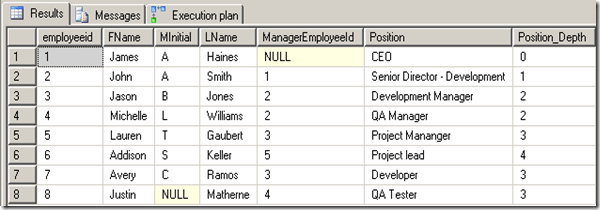
There you have it!!! Two methods to query hierarchal data. If you are curious about the performance difference between the two methods, the hierarchy id can be more performant and less costly than the recursive CTE. Each of these methods shines in their own way, and both have limitations. I leave it to you to decide which is best for your environment.
Happy Coding.